

REQUEST DEMO
Robot CATALOG will be sent to your mailbox immediately after submission.
SUBMIT
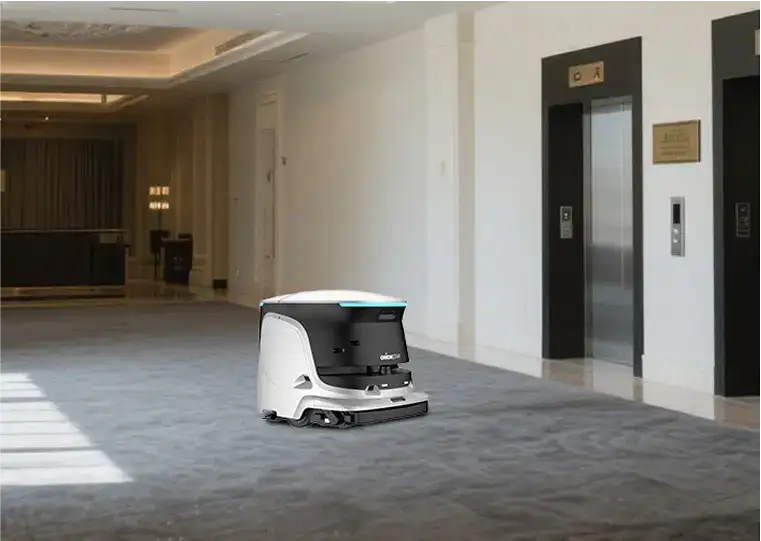
For cafeteria floor care, use our OrionStar CleaniBot C5’s 550mm main cleaning width to plan released open lanes after preclear, and evaluate OrionStar CleaniBot S55 Pro’s 55cm height only where overhead clearance matters. Chair reset, spill response and food-safety duties remain separate.
A cafeteria is not one uniform cleaning area. The entrance path may collect dry grit, serving queues can develop scattered crumbs, dining zones are repeatedly reshaped by chairs, and beverage stations may require controlled wet-floor work between busy periods. A useful robot decision separates these conditions instead of asking whether one machine can “clean the cafeteria.”
Define the project as floor care: debris removal, dry maintenance, wet cleaning where the floor and operating conditions allow it, and wastewater handling after wet work. Do not turn a floor-robot selection into a claim about disinfection, pathogen reduction, food safety, or hygiene certification. Those subjects require their own procedures, products, controls, and responsible teams.
The practical goal is to release staff from repeatable floor passes while retaining people for setup, exceptions, detailed edge work, restroom work if applicable, dining-room resets, and tasks that cannot be safely or practically standardized. A robot route should support the service rhythm rather than compete with it.
The most common planning error is sending a wet-cleaning route into a dining area that still has bulky or concentrated debris. Napkins, wrappers, straw covers, food fragments, cartons, and dropped utensils can interrupt the intended floor process. Establish a simple preclear standard: remove large items, collect bulky waste, address sharp or unusual objects, and move portable obstacles before a scheduled route begins.
Preclear does not mean staff must hand-clean the whole floor first. It means deciding which debris belongs in a manual pickup pass and which dry-floor maintenance task belongs in the robot plan. This distinction makes the route more repeatable and reduces the temptation to use wet cleaning as the first response to every post-meal condition.
Route design should also respect the edges of food preparation and dish-handling areas. Set clear operational boundaries at kitchen entrances, service counters, loading paths, floor drains, and any area where staff, carts, or changing work conditions make an autonomous route unsuitable. Boundary decisions are operational choices, not evidence that a robot has been approved for any food-related sanitation function.
| Zone or condition | First decision | Robot-planning question | Staff work that may remain |
|---|---|---|---|
| Entrance and queue lanes | Identify dry grit and peak crossing periods | Can a dry-maintenance route run before the queue forms or after it clears? | Spot pickup and exception response |
| Table field after a meal wave | Reset chairs and remove bulky debris | Are aisles consistently open enough for a repeatable pass? | Chair reset, table work, and edge detail |
| Beverage or condiment area | Classify the area as dry debris, localized wet residue, or both | Can wet work be scheduled when the area is controlled and accessible? | Immediate spill response and temporary area management |
| Kitchen threshold | Set a physical and procedural boundary | Does the planned route stop before changing back-of-house conditions? | Threshold cleanup and work inside restricted areas |
| Closed dining room | Confirm furniture layout and floor readiness | Can a longer recovery-oriented route run without disrupting reset work? | Preclear, inspection, and final exceptions |
Furniture density is often the deciding factor in a cafeteria. A route that looks open on a floor plan can become unusable when chairs are pulled back, highchairs appear, trays are parked temporarily, or cleaning carts occupy aisle ends. Walk the dining room during setup, peak use, and post-meal reset; each period can produce a different access pattern.
Measure actual clearance rather than relying on nominal aisle labels. CleaniBot S55 Pro’s 55cm height is one overhead-check input, not proof of under-table access; inspect chair legs, pulled-back chairs, turns and the effort of resetting furniture. S55 Pro is a candidate only when its vertical profile contributes to an accessible, repeatable floor-care route and a relevant mode fits the task. A lower body does not remove the labor of chair reset or make a furniture-dense layout automatically practical.
Compact positioning can be relevant where furniture and circulation create constrained working zones. CleaniBot S55 Pro is positioned as a compact commercial cleaning robot and supports six cleaning modes, but those facts do not establish that it can access a particular table layout or that every mode suits every floor surface. Consider S55 Pro when a walk-through confirms the intended route, turning points, floor material, and scheduled work mode.
Wet-floor work creates a workflow beyond the pass itself. The team needs a defined start condition, a route that avoids active meal traffic, a response for spills or changed conditions, and a destination for recovered wastewater. Review the floor surface and the facility’s own cleaning requirements before assigning wet work; a list of available modes or tasks is not proof of compatibility with every surface.
CleaniBot C5’s 550mm main cleaning pass and separate 45L tanks give the after-meal trial concrete inputs: released lane layout, pass overlap, water service and post-pass inspection. Time the whole sequence after preclear and chair reset rather than promising a meal-window finish from a specification. C5 is worth considering for a larger open dining route when repeatable scrub passes and recovery of used water fit the turnaround workflow. The decision should include the staff reset and service journey, not demand that the robot replace preclear, spill response or kitchen-side duties.
Where a facility is considering a workstation-supported workflow, confirm the physical installation and daily responsibilities rather than treating it as hands-free operation. With a suitable configured workstation, C5 supports automatic charging, clean-water refill, wastewater discharge, and wastewater-tank self-cleaning. These supported functions can change the handoff plan, but staff should still define checks, replenishment responsibilities, exception handling, and cleaning of the surrounding operating area.
A good shortlist names the work to be released, not just the machine to be purchased. For example, a site may want to release staff from a repeatable after-lunch dining-room pass while keeping personnel responsible for trash pickup, chair reset, spills, perimeter detail, and kitchen-side work. That is a clearer requirement than asking for a robot that does everything.
Use one route owner for each operating window. The owner does not need to perform every task, but should know when the area is ready, when the route can begin, what interrupts it, and who completes the remaining manual work. This prevents the common handoff gap in which staff assume someone else has moved chairs, precleared debris, or prepared the water and wastewater workflow.
CleaniBot C5 is positioned for large commercial settings, while CleaniBot S55 Pro is positioned as a compact commercial cleaning robot with six modes. Treat those as starting points for conditional comparison, not proof of fit. The final choice should follow a site walkthrough that checks the largest open zones, the tightest planned routes, the floor-care tasks required in each, and the staffing plan around meal windows.
Usually, plan the main route around meal windows rather than starting with active dining traffic. A limited route may be considered only where the area, access, staff handoff, and local operating conditions are controlled. Build the schedule from queue periods, chair movement, and reset windows.
Preclear removes bulky waste and unusual objects that do not belong in a routine wet-floor route. It also lets the team separate dry debris collection from wet-floor work, creating a more consistent route and a clearer manual exception process.
Consider C5 when the site needs a large-commercial floor-care candidate and the planned work can use its supported scrubbing, vacuuming, sweeping, dust mopping, and wastewater-recovery functions. Confirm actual route access, floor conditions, meal-window scheduling, and wastewater workflow before selection.
No. With a suitable configured workstation, CleaniBot C5 supports automatic charging, clean-water refill, wastewater discharge, and wastewater-tank self-cleaning. The facility still needs people and procedures for readiness checks, preclear, changed conditions, exceptions, and the surrounding operating area.
No. S55 Pro is positioned as a compact commercial cleaning robot and supports six cleaning modes, but that does not establish access through a specific furniture layout or compatibility with every floor surface. Check the actual route, turning areas, floor material, and intended work mode.