

REQUEST DEMO
Robot CATALOG will be sent to your mailbox immediately after submission.
SUBMIT
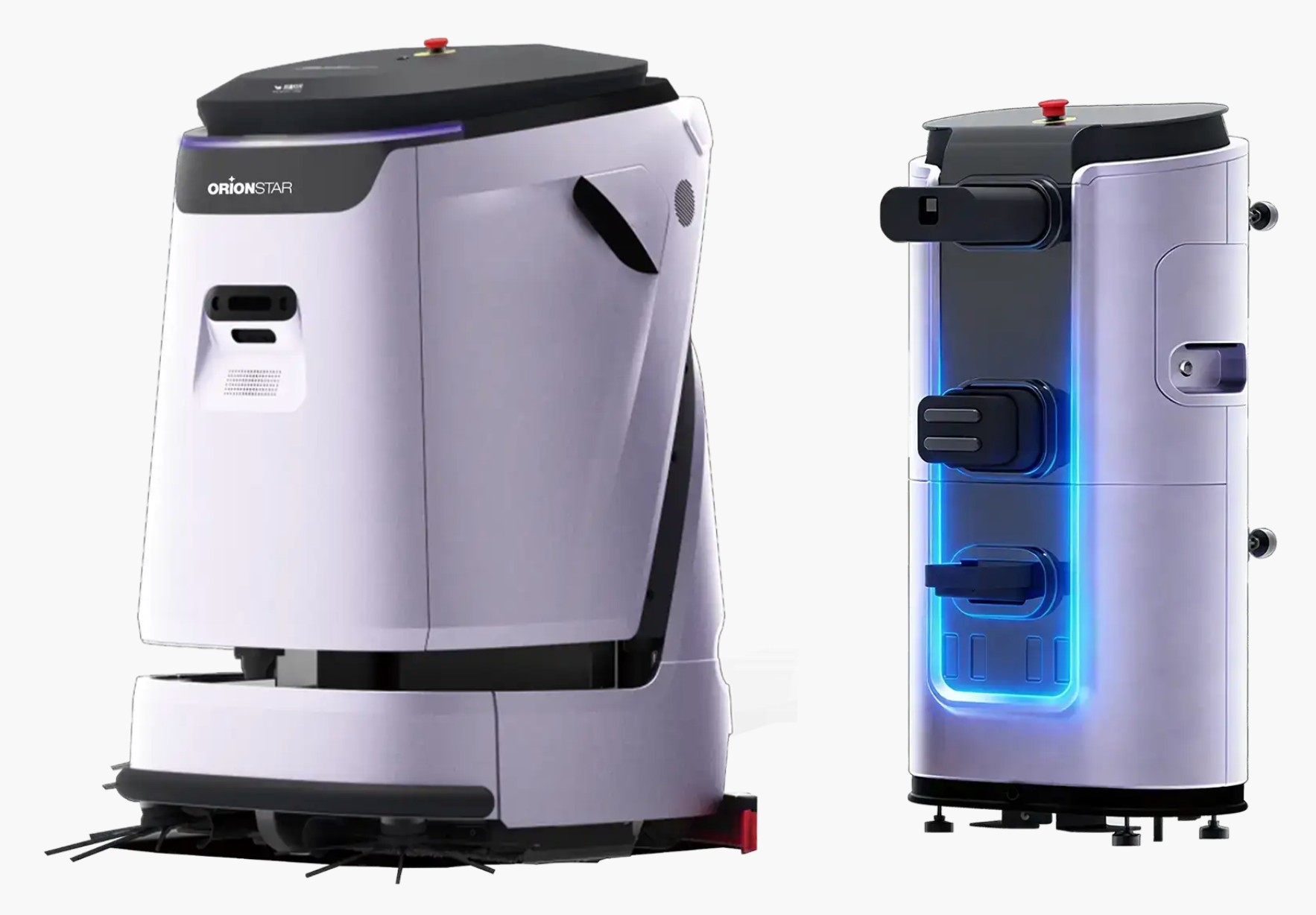
Size our OrionStar CleaniBot C5 fleet from measured cleaning, travel and service time within actual windows. Its separate 45L tanks and configured service station shape what to measure; the manual’s theoretical maximum is not a divisor for fleet count.
Large commercial spaces are rarely uniform cleaning environments. A distribution lobby, retail concourse, airport corridor, warehouse aisle, office floor, and public washroom approach can all have different soil levels, traffic patterns, floor materials, access rules, and cleaning expectations. Total square footage alone cannot show which areas need repeated attention, which must be completed before opening, or which can be cleaned during lower-traffic periods.
We suggest treating fleet sizing as an operational planning exercise rather than a robots-per-area calculation. The useful question is not how much floor the property contains. It is how much priority cleaning work must be completed in each zone, during which window, with what interruptions, and with what recovery time for service tasks.
Begin with a site walk that captures the real work conditions. Map open travel paths as well as narrow passages, staging areas, doors, ramps, bottlenecks, public-facing routes, and places where people, carts, pallets, or displays regularly change the route. A zone may look suitable on a floor plan but be operationally difficult if access is frequently blocked or if the route must be paused often.
| Zone input | What to record | Why it changes fleet sizing |
|---|---|---|
| Cleaning objective | Required task, expected appearance level, and whether the area needs routine, spill-response, or deep-clean attention | Different work types create different route, staffing, and service demands. |
| Floor and route conditions | Observed floor finish, transitions, slopes, thresholds, aisle width, obstacles, and route changes | A zone should be sized only after its usable route and surface suitability are confirmed. |
| Traffic profile | Busy periods, restricted access periods, pedestrian activity, vehicle movement, and temporary obstructions | Traffic reduces the time a robot can work continuously and may split a task into separate windows. |
| Cleaning window | When work may begin, when it must stop, and whether the window is fixed or flexible | The available window determines how much work must run concurrently. |
| Service needs | Where charging, water handling, wastewater handling, consumables, inspection, and manual intervention occur | Service-cycle time affects how much productive cleaning can fit into the window. |
| Operational fallback | Who responds to exceptions, what happens when a route is unavailable, and how priority work is recovered | A fleet plan needs a practical backup path rather than assuming uninterrupted operation. |
A zone workload template converts a broad cleaning request into comparable operating inputs. Use one template for every zone, including low-priority areas. This prevents the team from over-sizing the fleet around visible main corridors while overlooking short, high-priority windows in loading areas, entrances, or customer-facing spaces.
For each zone, document the required cleaning task, the usable route, the cleaning frequency, the available start and finish period, expected interruptions, and the service point the robot would use. Then note whether the zone can be moved to another window if traffic changes. A flexible zone may be scheduled around priority work; a fixed window may require dedicated concurrent capacity.
Keep route complexity separate from cleaning frequency. A frequently cleaned open zone may be operationally simpler than a less frequent area with doors, crossings, frequent layout changes, or a long trip back to a service location. This distinction helps facilities teams see where added robot availability would solve a scheduling issue and where a process or route change is needed instead.
Fleet sizing starts with how much robot time must fit inside each usable cleaning window, not simply with how many zones share that window. Identify jobs with fixed release and completion times, then calculate their cleaning, travel, and service time before deciding whether one robot can perform them in sequence.
For every planned assignment, include more than cleaning travel. Account for route startup, movement to and from the service point, pauses caused by traffic or access rules, inspection, recovery from blocked routes, and any required human handling. If the schedule only counts ideal cleaning time, it can appear workable on paper while failing as soon as routine interruptions occur.
Several priority zones sharing a window do not automatically require simultaneous robots. If their total occupied robot time—including cleaning, travel, and service—fits within one robot’s available time, they may be scheduled sequentially. Parallel capacity becomes necessary when one robot cannot meet the deadlines, but different release windows, indivisible jobs, service-point queues, and route dependencies still need an actual schedule.
For jobs that can use the same window, a starting capacity bound is N_min = ceil(T / W), where T is total occupied robot time and W is usable time per robot. Count each task, trip, and service interval once. This is only a lower bound: it does not prove that jobs can be assigned without conflicts, that every job fits its own window, or that shared service points can handle concurrent demand. CleaniBot C5’s manual lists 1980m²/h as a theoretical maximum cleaning efficiency, not verified usable productivity. Dividing total floor area by that rating does not establish T or a sufficient fleet: overlap, return travel, service and release restrictions still occupy robot time. The published test conditions are not supplied, so use measurements from the intended site assignments.
Illustrative planning example only—not C5 performance or customer data: suppose three hypothetical zone measurements are 30 minutes each, with another 30 minutes of travel and service in total. Occupied time is 120 minutes. In a common 150-minute window, one robot could potentially complete the jobs sequentially. In a 90-minute window, ceil(120 / 90) = 2 gives a capacity lower bound. Check the allocation of the nondivisible jobs, their individual release times and deadlines, and water or charging queues before concluding that two robots are sufficient. Use measurements from your own trial for the real plan.
| Planning question | Decision to make | What the result tells you |
|---|---|---|
| Which zones have fixed completion times? | Mark all work that cannot be moved without disrupting operations. | These zones establish the minimum concurrent workload. |
| Which zones overlap? | Place each job’s occupied time within its release and completion window; test sequential allocation first. | Overlapping windows alone do not require parallel work. Capacity and actual scheduling determine the need. |
| What service work occurs during the shift? | Include charging, water handling, wastewater handling, checks, and route recovery in the plan. | Service-cycle demand reduces the time available for productive cleaning. |
| Which work can move? | Classify zones as flexible only when operations can genuinely accept a different cleaning period. | Flexible tasks can be sequenced after fixed-window priorities are protected. |
| What happens when an assignment is interrupted? | Define whether the work resumes, is reassigned, is manually completed, or is deferred. | The answer determines the backup capacity and staffing needed. |
After the workload is defined, create a preliminary robot shortlist based on the task mix and the practical limits of the site. Do not assume that a robot positioned for a commercial environment is suitable for every floor, route, or cleaning routine. Confirm the actual surfaces, cleaning expectations, access conditions, and support requirements before assigning a model to a zone.
CleaniBot C5’s 550mm main cleaning width and separate 45L clean/45L wastewater tanks define trial inputs: pass overlap, water use, service travel and station queues. Measure occupied time per assigned job before applying the existing capacity lower bound. For a broad recurring scrub workload, C5 is a relevant candidate because cleaning passes and supply/recovery service can be planned together. The limiting resource may nevertheless be a shared station or an access window rather than another robot; include that constraint before adding fleet capacity.
Consider OrionStar CleaniBot S55 Pro when compact positioning is relevant to the routes being evaluated and the team needs to explore its six supported cleaning modes. The mode count does not establish compatibility with a particular floor or prove that every mode suits the facility’s cleaning standard. The site team should still verify the intended task, surface, route access, and expected operating conditions.
| Candidate decision | Site check before assigning work | Relevant product information |
|---|---|---|
| Large-area floor-care candidate | Confirm that the zone’s floor conditions, usable route, service location, and cleaning tasks fit the operating plan. | CleaniBot C5 is positioned as a large-capacity scrubber for large commercial settings and supports scrubbing, vacuuming, sweeping, dust mopping, and wastewater recovery. |
| Configured service-station workflow | Confirm whether the location, plumbing, utilities, access, and maintenance responsibilities support the proposed setup. | With a suitable configured workstation, C5 supports automatic charging, clean-water refill, wastewater discharge, and wastewater-tank self-cleaning. |
| Compact-route candidate | Confirm the actual route, floor, task, and cleaning expectation rather than inferring fit from compact positioning. | CleaniBot S55 Pro is positioned as a compact commercial cleaning robot and supports six cleaning modes. |
A fleet that can cover planned routes only in ideal conditions may not provide reliable operations. Build service-cycle capacity into the plan from the start. This means identifying where robots are prepared, where water and wastewater tasks occur, who inspects equipment, how consumables are handled, and how priority work is recovered when an assignment is delayed.
If a CleaniBot C5 workstation is part of the preliminary operating concept, treat it as a configured workflow with site requirements, not as a reason to remove human oversight. With a suitable configured workstation, C5 supports automatic charging, clean-water refill, wastewater discharge, and wastewater-tank self-cleaning. The facility still needs to define access, routine checks, cleaning responsibilities, and what staff should do when the workflow cannot proceed as planned.
Backup capacity can take different forms. It may be an available robot that can take over a priority zone, a manually recoverable cleaning procedure, a flexible lower-priority task that can be moved, or an attendant who can clear a route and resume operations. Choose the backup approach according to the consequence of a missed cleaning window, not simply according to how much equipment is available.
A staged capacity trial is a practical way to validate the assumptions behind a fleet plan. Start with representative zones that include the conditions most likely to affect scheduling: a priority window, normal traffic, a service cycle, a route with common obstructions, and a zone that may need recovery. The purpose is to learn whether the planned workflow holds under ordinary operating constraints.
During the trial, record only operational observations that affect the sizing decision: whether the route remains usable, whether tasks fit their assigned window, where staff intervention is needed, whether service activity creates a queue, and which zones can be rescheduled without reducing cleaning outcomes. Update the workload template and concurrency plan based on those observations before expanding coverage.
Stage expansion by adding the next most constrained zones rather than moving immediately to the largest possible coverage map. This approach exposes whether the real limitation is cleaning capacity, service-cycle capacity, route access, staffing, or the timing of the cleaning window. It also keeps the final fleet decision connected to documented site inputs.
Bring the completed zone workload template, shared cleaning-window schedule, route observations, task priorities, service-point options, and backup procedures to an equipment discussion. Ask which candidate configuration fits the observed task mix; what surface and route conditions need confirmation; what service setup is required; how charging, clean water, wastewater, and routine maintenance would be handled; and how the team should recover priority work when a route or service cycle is interrupted.
For CleaniBot C5, ask whether the proposed zones align with its large-commercial positioning and supported cleaning functions, and whether a suitable configured workstation is appropriate for the site’s planned service workflow. For CleaniBot S55 Pro, ask which of its six supported modes are relevant to the intended task and what site checks are needed before assigning it to the planned routes.
Measure cleaning, travel, and service time by job and place the jobs within their permitted windows. Where all jobs share one window, ceil(total occupied robot time / usable window) is a starting capacity lower bound, not a final fleet count. Test sequential assignment, indivisible jobs, individual deadlines, service queues, and backup arrangements before deciding.
Total area does not show traffic patterns, route restrictions, floor conditions, cleaning frequency, access limits, or whether several important zones must be completed at the same time. Zone workload and timing provide a more useful planning basis.
Service-cycle concurrency is the effect of charging, water handling, wastewater handling, inspections, and other service activity on the number of assignments that can remain productive at the same time. It should be included when planning available cleaning capacity.
Consider C5 when the site needs a large-capacity scrubber candidate for large commercial settings and the observed tasks, floor conditions, routes, service plan, and staffing process support its use. C5 supports scrubbing, vacuuming, sweeping, dust mopping, and wastewater recovery; suitability for a specific site still requires confirmation.
No. With a suitable configured workstation, CleaniBot C5 supports automatic charging, clean-water refill, wastewater discharge, and wastewater-tank self-cleaning. The operation should still define routine checks, access responsibilities, maintenance work, and a response plan for interruptions.